Pensions dashboards: guidance
Connecting to pensions dashboards
You need to have a digital interface in place to connect your scheme to the digital architecture. You also need to complete a number of steps before you connect.
The Money and Pensions Service (MaPS) has facilitated the connection of providers who are in turn facilitating schemes to connect, having regard to the staged connection approach set out in the Department for Work and Pensions (DWP) guidance. The staged connection of schemes is continuing, as set out in the DWP’s staged connection guidance. You can find more information about the connection process including the steps you need to take to connect on MaPS website.
Connection hub | UK Pensions Dashboards Programme
Choosing a digital interface
Your digital interface could be provided by:
- building your own interface if the scheme is administered in-house
- using an interface built by your scheme’s third-party administrator or software/ IT supplier
- using an interface provided by a third-party integrated service provider (ISP)
In most cases, the scheme will be using a connection provider, who has completed a testing process with MaPS to prove that they meet the relevant requirements and standards.
When selecting a connection provider, you should ensure that they can provide a service suitable for your scheme needs, for example, that they are able to support your matching policy. You can find out more about this in the working with advisers and providers section.
You will be required to provide your connection provider with certain information to enable your scheme’s registration and connection to take place on your behalf. You need to understand what the connection provider requires from you, and the timings of this. This includes:
- sharing your scheme’s registration code(s)
- providing your scheme’s Pension Scheme Registry Number (PSRN)
- ensuring that they are aware of your connection date as per guidance and any changes to this timeline
You can find out more about the steps to connection when connecting through a third-party on the MaPS website.
If you are considering building your own interface, be aware that connecting to the digital architecture will be a significant undertaking and you should engage with MaPS at the earliest opportunity. It will typically require specialist resource and experience to meet the standards that MaPS sets and will be subject to extensive testing. You can find more information about this in MaPS’ connection hub.
Whichever approach you take, you remain accountable for ensuring your scheme is connected to dashboards on time and that it remains compliant. You should ensure robust processes are in place for the selection, appointment, management and replacement of any suppliers.
Preparing your data for connection
You have legal duties to provide data to dashboard users which matches to your records. MaPS data standards set out how you provide this data, with the type, length and format requirements for key data (for example, how dates should be formatted). You need to ensure your data is prepared in the correct format.
You will also need to ensure your data is of sufficient quality to allow you to meet your duties. This includes both the data you need to find members in your records, and the data you need so you can provide them with accurate information about the value of their pensions. You can find out more in the sections prepare your data for matching and information to provide your members.
You should consider whether you have the right resources and capability to review and improve your data, or whether you need to secure additional support from data professionals. Where you have identified that data improvement work is required you should put a Data quality improvement plan in place, monitor its progress and ensure it is delivered in a timely manner.
If your scheme is using multiple providers to assist with your dashboard duties and the member data will be processed between these providers, you need to agree who will be performing certain tasks in contractual arrangements. It is good practice to reconcile the data held by different providers to ensure consistent outcomes for members (for example by reconciling the personal data held by your main administrator and AVC providers).
It is a requirement for UK General Data Protection Regulation (UK GDPR) purposes to complete a data protection impact assessment (DPIA) and keep a record of roles. If you already have a DPIA, you may need to update it.
MaPS has published its DPIA, regarding the processing of personal data as part of its role in delivering the dashboards digital architecture. You may wish to consider this document when preparing your scheme’s DPIA.
Registration codes
A registration code is a unique code that we will provide to your scheme, to enable you (or your connection provider on your behalf) to complete the registration process and connect to the digital architecture in line with MaPS’ Code of Connection.
The purpose of registration codes is to ensure the safety of the digital architecture by only allowing regulated entities to connect. They also ensure that compliance data (management information and reporting data) is correctly attributed to your scheme.
As the trustee or scheme manager you are responsible for handling registration codes, including securely providing these to your relevant connection provider. It is important that the codes we issue are kept safe until you use them. You should not share your registration code with your connection provider/s or administrators/AVC providers until you have agreed and communicated your connection journey with all relevant parties.
Your connection provider will use your code to register with MaPS and advise them of your chosen connection date. Connection will then happen automatically on that date and you must be able to meet your legal duties in respect of finding members and returning pension information from that date. If there are changes in your scheme’s circumstances which mean you can no longer achieve the connection date you had chosen, your ISP needs to notify MaPS no later than 7 days ahead of that date.
TPR supplies two unique registration codes for your scheme to the trustee whom you have nominated in Exchange as the Pensions Dashboards Primary Contact, or the scheme manager in the case of a public service pension scheme. These are issued around five months in advance of your ‘connect-by’ date. Please note that the registration codes will expire shortly after this ‘connect-by’ date.
Each connection provider will only require one registration code from your scheme to connect the section(s) of your scheme they are responsible for. If you are using only one connection provider, you will only need to use one registration code, and the other will expire in due course.
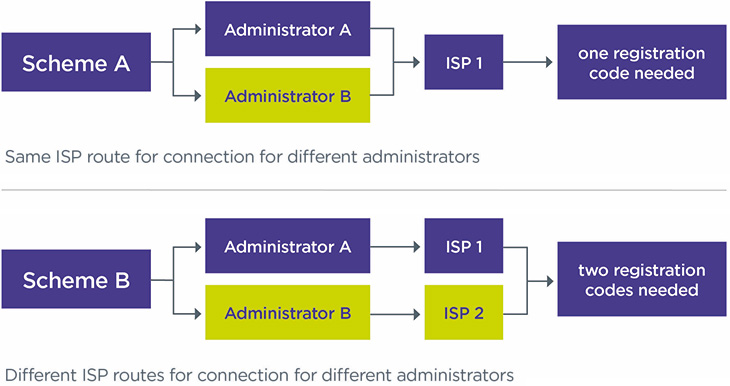
The following illustrations depict common scenarios your scheme may come across regarding registration codes.
Common scenarios
- If your registration code has been lost or misplaced, your Pensions Dashboards Primary Contact (nominated trustee or scheme manager) will need to contact our customer support team to obtain a new code. The previous code will be cancelled.
- If you are planning to connect later than your ‘connect-by’ date or significantly earlier than your ‘connect-by’ date, you will need to follow MaPS’ process to notify them of your new target date. MaPS will notify us and we will issue you with your registration code(s) ahead of this date.
- If you have applied to connect voluntarily and MaPS approves your application, we will generate and issue your registration codes ahead of the connection date you have agreed with MaPS.
- If your scheme has members with additional voluntary contribution (AVC) arrangements and your AVC providers will connect these arrangements to the dashboards on your behalf, your AVC providers will need to use one of your registration codes to connect these sections. If your AVC providers are sending the data to your primary administrator instead, you do not need to provide them with a registration code. For more detailed guidance, please refer to the section 'Connection of multiple sections'.
- If your scheme is segregated, you will need to connect all relevant sections using the PSR number of the ‘parent’ scheme as registered with TPR. You need to work with the connection providers for each of the segregated sections to understand how your scheme will be connected to the dashboard as a whole. For more detailed guidance, please refer to the section 'Connection of multiple sections'.
- If your ISP/connection provider informs you that they get an error message when using your registration code(s), your Pensions Dashboards Primary Contact (nominated trustee or scheme manager) will need to contact our customer support team to obtain a new code. Registration codes can only be entered three times and after this point an error message will be returned.
- If you need to connect a new administrator or provider after the rest of your scheme has connected, for example because you have taken on a new section, your Pensions Dashboards Primary Contact (nominated trustee or scheme manager) will need to contact our customer support team to obtain a new code. You should seek to connect the new administrator or provider as soon as practicable, and in the case of taking on a new section no later than three months from the new section joining.
- If you change administrator or provider after you have connected, you will not normally need new registration codes. MaPS has published guidance for ceding and receiving ISPs on the process.
Connection to the live environment
Once your scheme is connected to the live environment, you must be able to:
- receive personal data through ‘find requests’ that are issued by a user
- use this data to find members’ pensions in your records (‘match’)
- provide pensions information to members through dashboards (‘respond to view requests’)
There may be some requirements that you are unable to meet as soon as you have connected during the onboarding and user testing phase. For example, if you are using more than two connection providers, they may not be able to connect you on the same date. You should take prompt and effective action to investigate and correct any issues during this testing stage, including identifying any underlying causes. If you consider that the issues identified are materially significant, we expect you to consider if you need to report this to us (refer to our Breach of Law guidance for further details). We consider it highly unlikely that such a breach, in isolation, would be materially significant to us if it occurs before the connection deadline of 31 October 2026.
Connection of multiple sections
If your scheme has multiple sections, you need to understand how each section will be connected.
You may choose to connect all your sections through the same connection provider or use more than one connection provider. Each connection provider will need one unique registration code.
You will need to work with your administrators, additional voluntary contribution (AVC) providers, and your connection providers to agree the suitable connection solutions, depending on your own circumstances. You can check the Financial Conduct Authority register for current contact details of your AVC provider, if your provider is FCA regulated.
If you are using more than one connection provider and each use a different ISP, each ISP will require a unique registration code to connect the section(s) that they are responsible for on behalf of the scheme. This includes your AVC providers, if they are providing the information directly to dashboards on your behalf.
For example, if your scheme has defined benefit (DB) and defined contribution (DC) sections that are managed by different administrators with different ISPs, each ISP will need a unique registration code from you. However, if both administrators use the same ISP, only one registration code is needed to connect the different sections of the scheme. See Figure 1.
Figure 1: number of codes needed for connection depending on the number of ISPs used