
Pensions dashboards: guidance
Overview
Published: 22 June 2022
Last updated: 23 April 2026
See all updates
23 April 2026
In response to the latest guidance from the Money and Pensions Service (MaPS), progress with the build of the central digital architecture, clarification of policy intent from DWP, feedback from the industry, and ongoing developments and learnings, we’ve made further updates to our Pensions Dashboards guidance to help you understand and take the necessary actions to comply with your duties.
18 June 2025
In response to the latest guidance from the Money and Pensions Service (MaPS), feedback from the industry, and ongoing developments, we’ve made further updates to our Pensions Dashboards guidance to help you stay on track to compliance.
17 December 2024
Updates throughout the guidance to bring it in line with external developments and address industry feedback.
12 April 2024
Link to DWP guidance on annualised accrued value calculations added to information to provide to members.
26 March 2024
Rewrite of when your scheme needs to connect with dashboards to cover the new staged timeline for schemes to connect.
14 July 2023
Failing to comply with pensions dashboards duties updated to include information on how trustees and scheme managers will be expected to demonstrate that they have had regard to the guidance on staging timelines.
8 June 2023
Rewrite of when your scheme needs to connect with dashboards to cover the new deadline and staging timeline for schemes to connect.
15 March 2023
Significant updates throughout the guidance to incorporate the Pensions Dashboards Regulations 2022 and Money and Pensions Service standards.
20 July 2022
Updated guidance following government response to consultation on Draft Pensions Dashboards Regulations 2022.
As a pension trustee or scheme manager, you will need to connect with and supply pensions information to members through dashboards. This is your duty required by the Pensions Dashboards Regulations 2022. The Financial Conduct Authority (FCA) has made corresponding rules for FCA-regulated pension providers in respect of personal and stakeholder pension schemes.
The Department for Work and Pensions (DWP) has set out a staged timetable for schemes to connect to the dashboard digital architecture. Schemes are asked to connect over time according to their size and type. All schemes in scope must be connected by 31 October 2026 at the latest.
There is significant work involved to comply with your dashboards duties, and you may need to engage third-party providers to help you with this work, such as an administrator or an integrated service provider (ISP). You should work with your advisers to assess the impact of the changes and plan how you will meet your dashboard duties.
We will update this guidance when necessary to reflect further developments and the industry’s experience with dashboards. Find out more about how to stay up to date with developments.
What are pensions dashboards?
Pensions dashboards are digital services – apps, websites or other tools – which people will be able to use to see their pension information in one place. This includes information on their State Pension. Pensions dashboards will not show pensions that are already being paid.
A person will use dashboards to issue a search of the records of all connected pension schemes, to confirm whether or not they are a member. For simplicity in this guidance, we use the term ‘user’ to refer to users of the dashboards, and ‘member’ to refer to those who have been matched by schemes.
Dashboards aim to help members plan for retirement by:
- finding their various pensions and reconnecting them with any lost pension pots
- understanding the value of their pensions in terms of an estimated retirement income
Pensions dashboards: short films
Why do members need pensions dashboards? We’ve been speaking to members about their pensions experiences and how dashboards will help them in their planning.
The Money and Pensions Service (MaPS) will develop and host its own pensions dashboard on the MoneyHelper website. The MoneyHelper dashboard will be the first to be available to the public. Other organisations will also be able to develop and host private sector dashboards at a later stage. This will be subject to approval by the FCA. MaPS has sought feedback from industry on their proposed approach to deliver private sector dashboards.
You can find out more on the Pensions Dashboards Programme website.
You can find out more about the digital architecture on the MaPS website.
Which schemes are in scope?
Dashboards duties apply to the trustees or scheme managers of:
- registrable occupational pension schemes with 100 or more relevant members
- public service pension schemes
What constitutes a relevant member?
A relevant member is an active, deferred or pension credit member. In addition, members who have taken an uncrystallised funds pension lump sum (UFPLS) are considered in scope for dashboards.
Which members are out of scope?
Members which meet any of the following criteria are not relevant members and are therefore out of scope:
- are receiving benefits (pensioners)
- have cashed in their benefits to provide a tax-free lump sum, purchase an annuity or drawdown income
- have taken ‘partial retirement’ in respect of a benefit
- hold ‘dual benefits’ within a scheme, for example a DC and DB benefit, and has accessed either one of the benefits
- hold different periods of pensionable service within the same scheme (for example where they have left and then rejoined an employer) and they have accessed the pension accrued in one of these periods
Common in and out of scope scenarios
- If your scheme’s main administration is in the UK, it is in scope of the regulations, even if some sections are administered outside the UK. However, if your scheme’s main administration is based outside of the UK, it is not in scope.
- If your scheme is in the process of buying out, you will remain in scope until the buy-out is complete and the number of relevant members falls to zero. For example, when all relevant members of the occupational pension scheme have their own insurance policy. The duty to find and return the information for these members will move to the buy-out provider who will be subject to the Financial Conduct Authority’s (FCA) regulation.
- If your scheme had 100 or more relevant members at the scheme year end between 1 April 2023 and 31 March 2024 but then dropped under 100 relevant members because some of them retired or transferred out, you are still in scope and will be until the number of relevant members falls to zero.
- If your scheme is in the process of winding up, you are still in scope, unless the number of relevant members falls to zero. However, there are some exemptions to the information to provide to your members.
- If the whole of your scheme starts an assessment period with the Pension Protection Fund (PPF) before your connection deadline, you will be out of scope of the regulations for the duration of the assessment. However, if any sections of your scheme are not in assessment, the entire scheme is still in scope, but there are some exemptions to the information to provide to your members.
- If your scheme has members with additional voluntary contribution (AVC) arrangements, you need to work with the AVC provider(s) to identify which members are relevant, based on the scheme’s trust deed and rules, and the specific AVC arrangement details.
Your role and legal duties
- register your scheme with MaPS and connect to dashboards by a specific deadline
- receive personal information on users, and search and match members to their pensions (‘find requests’)
- provide members with information about their pension through the dashboard of their choosing upon request (‘view requests’)
- co-operate with MaPS when preparing to connect, maintain records and report certain information to us and MaPS
You will need to do all the above in compliance with standards published from time to time by MaPS and have regard to the DWP’s guidance on connection, considering the:
- staged timetable
- guidance issued by MaPS
- guidance issued by The Pensions Regulator (TPR)
Working with advisers and providers
You need to work with several organisations to comply with your dashboards duties. Typically, this involves providers assisting you with your data preparation and those assisting you with connection to the digital architecture (referred to in this guidance as ‘connection providers’), which may include your administrator, software providers, integrated service providers (ISP), actuary, and legal advisers. It could also include employers (to improve the availability and quality of personal data) and external data providers (for example AVC providers).
Early and regular engagement with relevant advisers and providers will help them plan their workload and improve their ability to support you. Additionally, if you need to procure new services or update existing contracts you should address this work at an early point to avoid delaying your preparations.
The dashboards duties apply to trustees and scheme managers. While you can use third parties to help you meet your duties, you are ultimately accountable for ensuring that your scheme is connected to dashboards on time and that you are (and remain) compliant with all the requirements. This includes ensuring that your data is of sufficient quality to enable you to find your members, and provide them with accurate information within legislative timelines.
You should be making any decisions required by your providers to progress their work in a timely manner, including agreeing actions to prepare your data. You also need to put in place robust ways to monitor progress. Where your third parties are supporting other clients, you should make sure they have enough capacity to deliver the services required so you can meet your legal obligations. For more information, see our Code of Practice, which includes a section on the selection, appointment, management and replacement of any suppliers.
Discussion points with third parties
Here is a list of areas that you may wish to discuss with your third-party providers. There will be more points that are specific to your scheme. We encourage you to keep a record of your enquiries, the response and any decisions made.
- Roles and responsibilities. It is important to be clear about the roles and responsibilities of those who are supporting you to meet your duties, and ensure there are no gaps in the process.
- Awareness of compliance requirements. When delegating any work to third parties, make sure they are aware of the relevant compliance requirements, for example the standards set by MaPS. You should also make sure that there are robust processes in place for them to implement new or changed requirements in a timely manner (such as changes in the standards).
- Costs. When negotiating contracts with service providers you need to ensure you understand what is included and where there may be additional costs, for example:
- the cost of initial connection and any ongoing service fee to maintain connection
- if costs are fixed for the scheme or per member and if there are additional costs for specific categories of your membership
- the cost of any work to assess, improve and maintain the quality of your scheme member data quality
- the cost of any work to ensure ongoing compliance with the standards or guidance published by MaPS or regulators
- any additional costs associated with testing for example testing of your matching criteria by your ISP
- any additional costs associated with queries for example in resolving possible matches
- whether there is any additional charge for any cyber related liabilities/requirements
You may also wish to review our Administration of a pension scheme guidance which includes a section on administration contracts.
- Data quality review and data quality improvement plan. Your scheme member data must be of sufficient quality to allow you to meet your dashboards duties. It is vital that you work with your administrators to review your data and, where required, set up and deliver improvement plans within a reasonable timescale. You should check with your administrator if this work will entail additional costs. Further information on preparing data for dashboards is also provided in the connection, matching and value sections.
- Monitoring progress. You should have a process in place to receive regular reports in line with the legal requirements and MaPS standards and other information you need to understand if you are meeting your duties. We recommend that pensions dashboards are a regular agenda item at your board meeting to monitor progress. Risks to delivery should be reflected on your risk register where appropriate.
MaPS standards
MaPS has set the standards relating to the provision of data through pensions dashboards and the digital architecture needed to support this. These standards provide the rules and controls that will facilitate the smooth ongoing connection to pensions dashboards. MaPS has published its approved standards, which schemes and providers must use to connect to the dashboards architecture and facilitate ongoing connection and associated reporting.
You (trustees and scheme managers) need to be aware of the requirements in these standards and ensure that your connection providers and scheme administrators are meeting them. You should remain alert to further requirements or changes. You should also, make sure that connection providers and administrators are closely aware of any developments in this area, and that they can implement changes to processes and systems safely, promptly and effectively.
The topics covered in these standards are as follows.
- Data standards: set out in detail how schemes receive data from the dashboards architecture and return appropriate data to dashboards. You should be working with your scheme administrators to deliver any required improvements to your scheme members’ personal and value data. You should ensure that the data is accurate, accessible and in line with these standards. Additionally, you need to work with your administrator to decide how you will use the codes in the standards to provide your members with relevant contextual information, for example where information is not currently available. More detail can be found in Preparing data for matching and for value data and Information to provide members.
- Reporting standards: set out information you need to ensure is generated, recorded and supplied, so that MaPS and TPR can monitor the effectiveness of pensions dashboards and compliance with regulations. You should be familiar with the record-keeping requirements set out in the standards and work with your third-party providers to ensure you are complying with them. Find more detail in record-keeping.
- Technical standards: set out how pension schemes (or their connection providers) interface with the dashboards architecture and user-facing pension dashboards. You should be seeking assurance from your connection providers that they are meeting these standards.
- Code of connection: sets out the connection, technical, security, service and operational standards you need to meet to connect to the digital architecture. This includes the timeframes you have to return data and the availability of the scheme’s connection to dashboards. You should be seeking assurance from your connection providers that they are meeting these standards.
Pensions dashboards: short films
Why do savers need pensions dashboards? We’ve been speaking to savers about their pensions experiences and how dashboards will help them in their planning.
When your scheme needs to connect with dashboards
All schemes with 100 or more relevant members at the scheme year end between 1 April 2023 and 31 March 2024 must connect to pensions dashboards.
The Department for Work and Pensions (DWP) has set out a staged timetable for schemes to connect to the digital architecture. Schemes are asked to connect over time according to their size and type, although all schemes must be connected by 31 October 2026.
Check your 'connect by' date
If you have more than one type of scheme, you should check the date for each.
Is your 'connect by' date
Deciding when to connect
The DWP has published guidance on connection: the staged timetable, aiming to reduce risks to delivery and help manage capacity in industry.
You must have regard to the DWP guidance and the separate onboarding process guidance that has been published by the Money and Pension Service (MaPS). This means you must read these and take them into account when making decisions around connection. We expect schemes to connect in line with the timeline set out in this guidance. Not following the guidance could expose you to greater risk of not being able to comply with your dashboards duties.
You will be expected to demonstrate how you’ve had regard to the guidance. Find further details in failing to comply with pensions dashboards duties.
All relevant memberships (in all sections of your scheme) need to be connected. If they are not, you need to take prompt and effective action to ensure all memberships are connected as soon as possible. We also expect you to consider whether you need to report such a breach to us. Refer to our breach of law guidance for further details.
Changing your connection plan
In exceptional circumstances, you may be unable to connect your scheme in line with your date in the DWP’s guidance. If you are planning to connect your scheme more than 30 days before or after your ‘connect-by’ date, you need to discuss your intention with your connection provider in the first instance and you should have regard to MaPS’ change of connection plans process and guidance.
MaPS will notify us of your updated ‘connect-by’ date, which we will reflect in our communications to you.
Changes to scheme size
The deadline still applies if your scheme changes size, unless you fall out of scope of the requirements entirely, for example if all your members become pensioner members.
If your scheme had fewer than 100 relevant members at the end of the 2023-24 scheme year, but reaches 100 or more relevant members on or after 1 April 2024, you must connect by the later of:
- six months after the end of the scheme year in which the threshold was reached, or
- 31 October 2026
You should also have regard to the DWP guidance on connection, even if your scheme falls into scope on or after 1 April 2024.
Schemes created on or after 1 April 2024
If your scheme is established on or after 1 April 2024 and has 100 or more relevant members, you should contact us so we can issue the registration code required to connect your scheme. Your connection deadline will be the later of:
- six months after the end of the scheme year in which the threshold was reached, or
- 31 October 2026
As above, you should also have regard to the DWP guidance on connection, even if your scheme falls into scope on or after 1 April 2024.
Schemes in Pension Protection Fund (PPF) assessment
Schemes that start PPF assessment before the connection deadline are not required to connect by the deadline. If the scheme exits PPF assessment but does not enter the PPF, it will need to connect by the later of:
- the connection deadline
- six months from the end of the assessment period
This only applies where the whole scheme is in PPF assessment. If only a section of your scheme is in assessment, your connection duties still apply.
If your scheme has already connected, but then starts a PPF assessment, you should stay connected and be able to match your members. However, you do not need to return value data while the scheme is in assessment. Instead, use the appropriate flags in MaPS’ data standards, which provide an explanation to the member.
Voluntary connection for smaller schemes
Registrable occupational pension schemes with 99 or fewer relevant members are currently not in scope of the regulations (see section which schemes are in scope for more details), but they can apply to MaPS to connect on a voluntary basis.
Connect voluntarily | UK Pensions Dashboards Programme
Once MaPS has granted permission to connect voluntarily, we will generate and issue your registration code ahead of the connection date you have agreed with MaPS. The scheme will need to connect by the date agreed with MaPS and comply with all the requirements that apply to schemes in scope, including following MaPS guidance and standards. If you decide to connect voluntarily, you must ensure that your scheme is able to find members and send them data as soon as you are connected and remain connected. You can find more information in the your role and legal duties section, and the ongoing connection and record-keeping requirements section.
Trustees and scheme managers are responsible for the decision to connect on a voluntary basis as well as the scheme’s compliance, and you should be clear on these ongoing legal duties when making the decision.
Talk to your administrator or provider if you would like to connect voluntarily.
Deferral applications
The window for applications to defer the connection deadline of 31 October 2026 has now closed.
Check your 'connect by' date without using the tool
Master Trusts
| Number of active and deferred members | Connect by |
|---|---|
| 20,000 or more | 30 April 2025 |
| 5,000 to 19,999 | 31 May 2025 |
| 1,000 to 4,999 | 30 June 2025 |
Defined contribution (DC) schemes used for automatic enrolment
| Number of active and deferred members | Connect by |
|---|---|
| 5,000 or more | 31 May 2025 |
| 1,000 to 4,999 | 30 June 2025 |
Defined benefit schemes, all other DC schemes, all hybrid schemes (including hybrid master trusts)
| Number of active and deferred members | Connect by |
|---|---|
| 20,000 or more | 31 May 2025 |
| 5,000 to 19,999 | 30 June 2025 |
| 2,500 to 4,999 | 31 August 2025 |
| 1,500 to 2,499 | 30 September 2025 |
| 1,000 to 1,499 | 30 November 2025 |
CDC schemes
| Number of active and deferred members | Connect by |
|---|---|
| All sizes | 30 September 2025 |
Public service schemes
| Number of active and deferred members | Connect by |
|---|---|
| All sizes | 31 October 2025 |
Schemes with 100 to 999 relevant members
| Number of active and deferred members | Connect by |
|---|---|
| 750 to 999 | 31 January 2026 |
| 600 to 749 | 28 February 2026 |
| 400 to 599 | 31 March 2026 |
| 320 to 399 | 30 April 2026 |
| 250 to 319 | 31 May 2026 |
| 195 to 249 | 30 June 2026 |
| 155 to 194 | 31 July 2026 |
| 125 to 154 | 31 August 2026 |
| 100 to 124 | 30 September 2026 |
Connecting to pensions dashboards
You need to have a digital interface in place to connect your scheme to the digital architecture. You also need to complete a number of steps before you connect.
The Money and Pensions Service (MaPS) has facilitated the connection of providers who are in turn facilitating schemes to connect, having regard to the staged connection approach set out in the Department for Work and Pensions (DWP) guidance. The staged connection of schemes is continuing, as set out in the DWP’s staged connection guidance. You can find more information about the connection process including the steps you need to take to connect on MaPS website.
Connection hub | UK Pensions Dashboards Programme
Choosing a digital interface
Your digital interface could be provided by:
- building your own interface if the scheme is administered in-house
- using an interface built by your scheme’s third-party administrator or software/ IT supplier
- using an interface provided by a third-party integrated service provider (ISP)
In most cases, the scheme will be using a connection provider, who has completed a testing process with MaPS to prove that they meet the relevant requirements and standards.
When selecting a connection provider, you should ensure that they can provide a service suitable for your scheme needs, for example, that they are able to support your matching policy. You can find out more about this in the working with advisers and providers section.
You will be required to provide your connection provider with certain information to enable your scheme’s registration and connection to take place on your behalf. You need to understand what the connection provider requires from you, and the timings of this. This includes:
- sharing your scheme’s registration code(s)
- providing your scheme’s Pension Scheme Registry Number (PSRN)
- ensuring that they are aware of your connection date as per guidance and any changes to this timeline
You can find out more about the steps to connection when connecting through a third-party on the MaPS website.
If you are considering building your own interface, be aware that connecting to the digital architecture will be a significant undertaking and you should engage with MaPS at the earliest opportunity. It will typically require specialist resource and experience to meet the standards that MaPS sets and will be subject to extensive testing. You can find more information about this in MaPS’ connection hub.
Whichever approach you take, you remain accountable for ensuring your scheme is connected to dashboards on time and that it remains compliant. You should ensure robust processes are in place for the selection, appointment, management and replacement of any suppliers.
Preparing your data for connection
You have legal duties to provide data to dashboard users which matches to your records. MaPS data standards set out how you provide this data, with the type, length and format requirements for key data (for example, how dates should be formatted). You need to ensure your data is prepared in the correct format.
You will also need to ensure your data is of sufficient quality to allow you to meet your duties. This includes both the data you need to find members in your records, and the data you need so you can provide them with accurate information about the value of their pensions. You can find out more in the sections prepare your data for matching and information to provide your members.
You should consider whether you have the right resources and capability to review and improve your data, or whether you need to secure additional support from data professionals. Where you have identified that data improvement work is required you should put a Data quality improvement plan in place, monitor its progress and ensure it is delivered in a timely manner.
If your scheme is using multiple providers to assist with your dashboard duties and the member data will be processed between these providers, you need to agree who will be performing certain tasks in contractual arrangements. It is good practice to reconcile the data held by different providers to ensure consistent outcomes for members (for example by reconciling the personal data held by your main administrator and AVC providers).
It is a requirement for UK General Data Protection Regulation (UK GDPR) purposes to complete a data protection impact assessment (DPIA) and keep a record of roles. If you already have a DPIA, you may need to update it.
MaPS has published its DPIA, regarding the processing of personal data as part of its role in delivering the dashboards digital architecture. You may wish to consider this document when preparing your scheme’s DPIA.
Registration codes
A registration code is a unique code that we will provide to your scheme, to enable you (or your connection provider on your behalf) to complete the registration process and connect to the digital architecture in line with MaPS’ Code of Connection.
The purpose of registration codes is to ensure the safety of the digital architecture by only allowing regulated entities to connect. They also ensure that compliance data (management information and reporting data) is correctly attributed to your scheme.
As the trustee or scheme manager you are responsible for handling registration codes, including securely providing these to your relevant connection provider. It is important that the codes we issue are kept safe until you use them. You should not share your registration code with your connection provider/s or administrators/AVC providers until you have agreed and communicated your connection journey with all relevant parties.
Your connection provider will use your code to register with MaPS and advise them of your chosen connection date. Connection will then happen automatically on that date and you must be able to meet your legal duties in respect of finding members and returning pension information from that date. If there are changes in your scheme’s circumstances which mean you can no longer achieve the connection date you had chosen, your ISP needs to notify MaPS no later than 7 days ahead of that date.
TPR supplies two unique registration codes for your scheme to the trustee whom you have nominated in Exchange as the Pensions Dashboards Primary Contact, or the scheme manager in the case of a public service pension scheme. These are issued around five months in advance of your ‘connect-by’ date. Please note that the registration codes will expire shortly after this ‘connect-by’ date.
Each connection provider will only require one registration code from your scheme to connect the section(s) of your scheme they are responsible for. If you are using only one connection provider, you will only need to use one registration code, and the other will expire in due course.
The following illustrations depict common scenarios your scheme may come across regarding registration codes.
Common scenarios
- If your registration code has been lost or misplaced, your Pensions Dashboards Primary Contact (nominated trustee or scheme manager) will need to contact our customer support team to obtain a new code. The previous code will be cancelled.
- If you are planning to connect later than your ‘connect-by’ date or significantly earlier than your ‘connect-by’ date, you will need to follow MaPS’ process to notify them of your new target date. MaPS will notify us and we will issue you with your registration code(s) ahead of this date.
- If you have applied to connect voluntarily and MaPS approves your application, we will generate and issue your registration codes ahead of the connection date you have agreed with MaPS.
- If your scheme has members with additional voluntary contribution (AVC) arrangements and your AVC providers will connect these arrangements to the dashboards on your behalf, your AVC providers will need to use one of your registration codes to connect these sections. If your AVC providers are sending the data to your primary administrator instead, you do not need to provide them with a registration code. For more detailed guidance, please refer to the section 'Connection of multiple sections'.
- If your scheme is segregated, you will need to connect all relevant sections using the PSR number of the ‘parent’ scheme as registered with TPR. You need to work with the connection providers for each of the segregated sections to understand how your scheme will be connected to the dashboard as a whole. For more detailed guidance, please refer to the section 'Connection of multiple sections'.
- If your ISP/connection provider informs you that they get an error message when using your registration code(s), your Pensions Dashboards Primary Contact (nominated trustee or scheme manager) will need to contact our customer support team to obtain a new code. Registration codes can only be entered three times and after this point an error message will be returned.
- If you need to connect a new administrator or provider after the rest of your scheme has connected, for example because you have taken on a new section, your Pensions Dashboards Primary Contact (nominated trustee or scheme manager) will need to contact our customer support team to obtain a new code. You should seek to connect the new administrator or provider as soon as practicable, and in the case of taking on a new section no later than three months from the new section joining.
- If you change administrator or provider after you have connected, you will not normally need new registration codes. MaPS has published guidance for ceding and receiving ISPs on the process.
Connection to the live environment
Once your scheme is connected to the live environment, you must be able to:
- receive personal data through ‘find requests’ that are issued by a user
- use this data to find members’ pensions in your records (‘match’)
- provide pensions information to members through dashboards (‘respond to view requests’)
There may be some requirements that you are unable to meet as soon as you have connected during the onboarding and user testing phase. For example, if you are using more than two connection providers, they may not be able to connect you on the same date. You should take prompt and effective action to investigate and correct any issues during this testing stage, including identifying any underlying causes. If you consider that the issues identified are materially significant, we expect you to consider if you need to report this to us (refer to our Breach of Law guidance for further details). We consider it highly unlikely that such a breach, in isolation, would be materially significant to us if it occurs before the connection deadline of 31 October 2026.
Connection of multiple sections
If your scheme has multiple sections, you need to understand how each section will be connected.
You may choose to connect all your sections through the same connection provider or use more than one connection provider. Each connection provider will need one unique registration code.
You will need to work with your administrators, additional voluntary contribution (AVC) providers, and your connection providers to agree the suitable connection solutions, depending on your own circumstances. You can check the Financial Conduct Authority register for current contact details of your AVC provider, if your provider is FCA regulated.
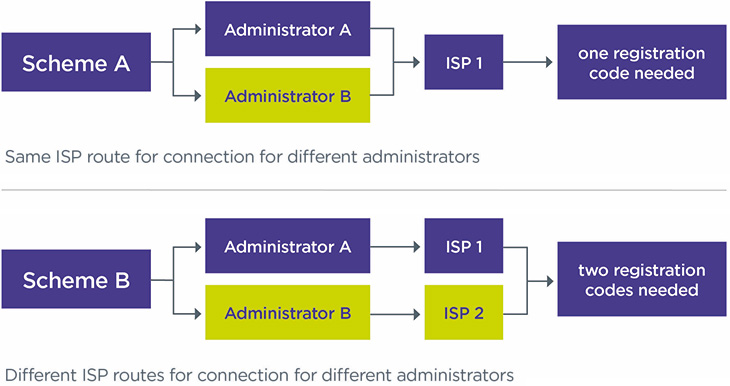
If you are using more than one connection provider and each use a different ISP, each ISP will require a unique registration code to connect the section(s) that they are responsible for on behalf of the scheme. This includes your AVC providers, if they are providing the information directly to dashboards on your behalf.
For example, if your scheme has defined benefit (DB) and defined contribution (DC) sections that are managed by different administrators with different ISPs, each ISP will need a unique registration code from you. However, if both administrators use the same ISP, only one registration code is needed to connect the different sections of the scheme. See Figure 1.
Figure 1: number of codes needed for connection depending on the number of ISPs used
Matching people with their pensions
When a person uses a pensions dashboard, you will receive certain personal data from the digital architecture. You will need to use the data to search your records and determine if you have a pension for them. This process is called ‘matching’.
Information included in the ‘find request’
The potential member will be verified by GOV.UK One Login before they can issue a ‘find request’. This means you can be confident the user is who they say they are.
Once a potential member has been successfully verified, their details are added to other information they have provided, to be used for ‘find requests’. This may include National Insurance number, previous names, addresses, email address(es) and mobile phone number(s).
Schemes will receive a ‘find request’ with all provided information, to match the user to their pensions. Once a user successfully proves their identity, the find request will include the following core identity information:
- first name
- last name
- date of birth
- email address
- mobile number, if used for 2-factor authentication, but this may not be provided if the member chooses to use an authenticator app
GOV.UK One Login will also check that any UK address provided exists and has an association with the user, through credit records.
Dashboards users may also provide additional information. This is limited to National Insurance numbers, but in future it may also include previous or alternative surnames and contact details.
All data will be provided in accordance with the format set out in the data standards set by MaPS.
GOV.UK One Login has also confirmed how ‘special characters’ will be treated in names and addresses.
You can find more detail on the data that schemes will receive on the MaPS identity service page.
Preparing your data for matching
You must match your members with their pensions and ensure that the quality of your scheme member data is good enough to enable you to do this effectively. You will need to assess the data you plan to use for matching. Many administrators or ISPs can provide you with bespoke reports if required. You should work with your administrator, connection provider or other advisers to identify and resolve any data quality issues. You should consider all relevant records in your schemes, including AVC benefits where they apply.
You should review our guidance on Assessing member data quality and interrogate your scheme member data to consider the extent to which it is:
- complete and accurate
- digitally searchable for dashboards purposes
If your data is not reliable, you risk returning data for the wrong person or not finding a pension record when you should. This may lead to enforcement action being taken against you by us or the Information Commissioner’s Office (ICO).
Where problems are identified with the quality of the data you plan to use for matching, you need to take targeted action to resolve them and document this in a data quality improvement plan. You may also want to consider any proactive actions you can take to resolve known data quality issues. For example, you could run scans to identify missing or temporary National Insurance numbers and ask employers to provide complete information. Additionally you could consider reducing data gaps by running tracing exercises or collecting additional data points such as email addresses and mobile phone numbers.
You should understand your obligations under data protection law and have processes in place for protecting scheme data. This includes being able to manage your data to comply with data protection legislation and to address any breaches. You can find out more about your duties in our code of practice.
Matching, combining or comparing data from multiple sources requires a Data Protection Impact Assessment (DPIA) under UK General Data Protection Regulation (UK GDPR), so you may need to produce one. If you already have a DPIA, you may need to update this. You can find out more about DPIAs on the ICO website.
Setting the criteria for matching
You should decide what data to use to match members to their pensions (your ‘matching criteria’), based on your scheme’s data quality and availability. It is vital that your scheme’s matching criteria is in line with the level of confidence that you have in the quality of your data.
Your matching criteria may evolve over time. It’s anticipated that many schemes will use last name, date of birth and National Insurance numbers for matching. If you are not satisfied with the quality of the data items, you will need to decide how great this risk is and whether you want to use any of these items in your ‘matching criteria’. You could consider widening your matching criteria to include further data items such as first name, alternative names, personal email address or postcode. This should increase your confidence that you are matching to the right person, without increasing the risk that you fail to find someone when you should. The Pensions Administration Standards Association (PASA) has published guidance around data and matching. You may wish to consider this when deciding on your approach to matching.
You should review your matching criteria on a regular basis and refine them to reflect changes such as data quality improvements or learnings from your providers’ reports. You should have a clear mechanism for approving changes to your matching criteria. To ensure that you continue to effectively match over time, you must ensure you maintain the quality of your scheme member data on an ongoing basis. You can find out more in our guidance on scheme member data quality.
You must keep a record of your matching policy for at least six years from the end of the scheme year in which the decision is taken. You should record the matching criteria you are using for the scheme generally. You are not expected to record the criteria used for each individual search. Your records should include the key considerations you have made in setting your criteria, a record of any changes and the rationale for these. You may also want to include the following in your matching policy:
- How you will manage and resolve possible matches and any resulting queries.
- Details of how regularly you will receive and review reports on matching performance from your provider(s).
- The governance process you will follow to monitor the effectiveness of your matching criteria and make any changes required.
- How you will review your matching criteria, and how often.
See further record-keeping requirements on matching in ongoing connection and record-keeping requirements.
Match is found
If you are confident that you have found a member’s pension record using the information they provided, you have ‘made a match’.
You must create and register a unique identifier, also known as Pension Identifier (PeI), with the digital architecture, to meet MaPS’ technical standards. The PeI does not contain any pensions information but acknowledges that there is a match. The member can then ask to view their information and you should return the relevant data directly to the dashboard. For more information, see information to provide to members.
If someone leaves your scheme or retires, you need to remove their match from the digital architecture by ‘de-registering’ their PeI as soon as possible.
Possible match is found
In some cases, you might not be certain enough that you have ‘made a match’ to release a member’s pension data. For example, the National Insurance number and date of birth match, but the last name doesn’t. This could happen if a member has married but failed to notify the scheme of their new last name.
In these circumstances, you should return a ‘possible match’ to the member. You must create and register a PeI with a ‘possible’ match status. In this case you will only send a message to inform the member that they may have a pension, but that they need to provide more information via the given contact details to confirm this. You can do this by using an appropriate code, from the data standards.
The user has 30 days to contact you once you’ve returned a possible match. If they do, you must resolve the possible match promptly, including during user testing.
If they do not make contact within 30 days, or you are unable to resolve the match in a timely manner following contact, you must delete their personal information and deregister the PeI.
You should work with your administrator or connection provide to ensure they have the right processes and resources in place to resolve possible matches.
You should consider what actions you can take to improve your scheme member data and reduce the number of possible matches you receive. This may include the following:
- Proactively scanning for missing or temporary National Insurance Number and contacting members or employers to resolve these.
- Proactively contacting members to provide missing information.
- Prompting members to review their personal information when they contact you for another reason or use another service such as an app or online portal.
- Merging duplicate records.
- Enriching your data, for example by capturing mobile telephone numbers or private email addresses.
The reports you receive from your providers on matching performance can also help you identify data to prioritise for improvement.
You also need to decide how you will manage and resolve possible matches ie how you will confirm whether the dashboard user is, or isn’t, a member of your scheme.
You need to consider which information you will use to verify the identity of the member contacting you, and put in place a route for possible match queries, such as providing an enquiry form, a dedicated contact team to resolve queries, or an AI-enabled web-based solution.
Match cannot be found
If you determine that you do not hold a pension for the user, including following the ‘possible match’ process, you must delete the personal information provided as there are no legal reasons to keep it and you will otherwise breach the GDPR requirements.
Schemes with multiple sections or administrators
If your scheme has multiple sections and there are different administrators for some of your sections, you need to work with all your administrators to agree the most suitable approach for your scheme in the following situations.
- Where there are discrepancies in the data quality for each of the sections, you may want to have more than one set of ‘matching criteria’.
- Where a member has multiple benefits across your scheme and has been successfully matched for one section, but a ‘possible match’ for another, you will need to consider the level of information to provide to the member.
- Where you have multiple sections with different administrators, you must consider which contact information is provided to the member. This may depend on the approach of your connection routes.
If your scheme has a very complex benefit structure, you may also consider performing a data mapping exercise to understand where data is held, who is involved in providing it, as well as any gaps. Where necessary, you should consider updating contractual agreements with your providers.
You may wish to consider the toolkit that PASA has published, if your scheme has sections including AVCs.
Information to provide to members
You will have to supply the following information to your members via pensions dashboards.
- Administrative and Signpost data
- Value data
Administrative and signpost data
Administrative data includes, the scheme name, the dates the member was in it, the name and contact details for the administrator and, if available, the employer’s name. You should ensure these are consistent with the information you provide in other communications. You will also need to provide a member’s date of birth to enable dashboards to show the time to retirement (the date of birth itself will not be shown on dashboards).
Signpost data is also referenced as ‘additional data’ in the Money and Pensions Service (MaPS) data standards. These are links to websites where the member can see other useful information about the scheme, such as information on costs and charges, the scheme’s statement of investment principles and the scheme’s implementation statement.
You must return the above information immediately after a view request is received.
Value data
You need to provide details of how much pension the member has built up already and how much they may have when they retire (their ‘estimated retirement income’). The value data that you need to supply will depend on the status of the member and the benefit type. The table at the bottom of this page provides a high-level overview of what data should be provided for each benefit type.
You must understand what value information you need to provide to your members, ensuring it is accurate and available within the timings set out in the Pensions Dashboards Regulations.
You must provide value data immediately if it is based on a statement provided to a member in the last 13 months, or a calculation made for the member in the last 12 months (for example if there was a previous request made on a dashboard).
Where this is not the case, you will only have three working days to return value data, along with the relevant contextual information, where all benefits provided to the member are defined contribution (DC) benefits. You will only have 10 working days in all other cases, such as defined benefits (DB) and hybrid benefits. Therefore, it may be more efficient to put in place a process to revalue pensions annually or automate the calculation of values in your administration system. You should work with your administrator to ensure that the right processes and resource are in place to meet the deadlines for any values that need calculating on demand. As good practice, you may want to identify how you will manage more complex scenarios such as members with late retirement or hybrid benefits.
If your scheme has members with benefits across different sections or multiple benefit types, for example, a DB element and an AVC value, you may present each benefit to the member using a different illustration date. The Department for Work and Pensions (DWP) has confirmed that the policy intent is that illustration dates should align at a benefit level. This means that:
- the accrued and projected values for each DB or DC benefit should be calculated on the same date for each benefit
- the DB benefit for a member can be calculated on a different day to their DC benefit, as these are different benefits
- if a member has two separate AVC arrangements they can also be calculated on different dates to each other, as they are different benefits
In determining values to return, you should consider alignment with other communications. For example, if you return information different from that issued to the member in their annual benefit statement, you should consider how best to explain this difference to members. You may wish to proactively communicate any differences to your members, for example in their statement, on your member portal, or in a regular newsletter.
MaPS has published supplementary guidance on benefit illustrations, which you can use alongside the data standards to improve your understanding of returning value data.
Contextual information
You must provide contextual information to help your members understand the value data displayed to them via the dashboard. This includes the following:
- The date to which the value relates (the ‘as at’ date/’illustration’ date).
- The date from which a benefit is payable.
- Whether there is a spouse’s or civil partner’s survivor benefit attached to the pension.
- Whether the benefits would increase in payment.
- Why value data is not available.
In some circumstances, you may not be able to provide value information to members immediately. Most commonly, this will be because you need to calculate this to return within three days (DC benefits) or 10 days (all other benefits). In this case, you should return the unavailable codes DCC (DC benefits) or DBC (other benefits) so the member knows how long they will need to wait before they can view their value information via the dashboard.
There are other circumstances where you may be unable to return values. Where this is the case, you must use the unavailable codes specified in the reporting standards, which include:
- Ref 2.004, “contact scheme”: Use this code to indicate there has been a match but the user should contact the pension provider/scheme before it provides any or all the user’s pensions information. You should only use this code in exceptional circumstances for example if a potential fraud is being investigated, or a legal challenge is under way.
- Ref 2.006, “temporary system error”: Use this code to explain to the user that some or all of the pensions information is not available due to a temporary system error and they should re-try shortly.
- Ref 2.301 and Ref 2.401, for the following codes:
- ANO: Benefits cannot currently be provided as information is required from a third party (for example, a final leaving salary from the employer for a DB benefit).
- MEM: Benefits cannot currently be provided because there is an action or decision outstanding from the user.
- NET: User is a new member of the scheme as a result of a transfer in and value pension information is not yet available.
- NEW: User is a new member of the scheme and value data is not yet available.
- TRN: Transaction outstanding that affects the value.
You should work with your administrator or connection provider to identify where you may need to use these codes. You should keep a clear record of your rationale for their use and the number of members impacted.
The use of the codes does not remove your duty to return information, and you will need to be able to demonstrate that you have an appropriate process in place to provide your members with the missing information in a timely manner. Where there is a severe delay in providing the value information to your members, you should consider if you need to report this to us. See: Assess whether to report a breach of the law.
PASA has published guidance that you may wish to consider when deciding how you will use the codes provided within the data standards.
DC values
DC projected values should be calculated in line with the Financial Reporting Council actuarial standards (known as AS TM1) for statutory money purchase illustrations. DC accrued annual income should also be calculated by reference to AS TM1, but leaving out the impact of future contributions and fund growth. The DWP has developed guidance on how to calculate the annualised accrued value for DC schemes, including available methods. See annualised accrued value calculations for pensions dashboards.
You do not have to provide a projected value (using codes Ref 2.301 DCHA/DCHP in the data standards) if the member is within two years of retirement or where all the following apply:
- the accrued value (to money purchase benefits/hybrid benefits) was less than £5,000 when last calculated and provided to the member
- no contributions (including transfers and pension credits) have been made since
- the scheme has informed the member that further projections will not be given unless further contributions are made
You can still provide a projected value in these situations if you choose to.
DB values
You should calculate DB values in line with scheme rules, without taking into account possible increases in earnings for active members. You should only factor revaluation rates into projections where these are guaranteed under scheme rules.
However, for the first two years of being connected, you can provide a simplified calculation of deferred benefits revalued using an adjustment method you consider to be appropriate (for example, using inflation figures). You can only do this if providing a value in line with scheme rules would be disproportionately expensive or take too long, and you are confident the alternative value provided would not be misleading. You must also confirm in the information you provide that you are using this basis for calculation, in line with the data standards. During these two years you should deliver the data and system improvements required to be able to provide a value in line with scheme rules.
If the member’s DB benefits have different tranches, you can choose to either provide one single value (showing a common retirement date) or separate values for each tranche (with their own retirement date).
Collective defined contribution (CDC) values
You must provide an accrued value and a projected value for active members and a projected value for deferred members. You should provide your members with the value calculated on a central estimate basis (“as scheme estimated”).
Public service pension schemes
Public service schemes, excluding judiciary and local government schemes, will need to provide two sets of values that reflect the McCloud remediation process – one for each option they can select at retirement.
Exemptions – Schemes in PPF assessment/wind-up/buyout
If your scheme, or a section of your scheme, goes into PPF assessment after you’ve connected to the digital architecture, you will need to remain connected. However, you are only required to provide administrative data and messaging confirming the scheme, or section, is in PPF assessment using the appropriate codes in the data standards.
Schemes, or sections of schemes, in the process of winding up will need to connect to the digital architecture and provide administrative data, but do not have to provide value information to members (though they can do so voluntarily). If your scheme has entered into a buyout process, but has not yet triggered wind-up, then you should still meet the requirements for providing value information.
Exemptions – new members
For new members who request view data within the first three months of joining the scheme, you will need to provide the administrative data as soon as you can and no later than three months after the member joined the scheme. You are required to provide the value data, along with relevant contextual information, as soon as you can. This should be no later than when you first produce a statement of the members’ benefits for them, or 12 months from the end of the first full scheme year they have been in the scheme, whichever is soonest.
Quality of scheme member value data
You must ensure that your scheme member data is of sufficient quality to enable you to provide your matched members with accurate and recent value data within the timescales set out in the Pensions Dashboards Regulations. Data will need to be digitised so that it can be returned through the digital architecture. You should test the accuracy of the data items you need to calculate accurate values. Our scheme member data quality guidance provides further information on the actions you can take to conduct a robust assessment of your scheme member data quality Assessing member data quality.
You must ensure that calculations are undertaken and recorded correctly. You should assure yourself that appropriate controls are built into your administrator’s calculation processes. This may include testing the accuracy of a sample of calculations, building in additional checks for complex cases or even commissioning third parties to do end-to-end testing of your administrator’s processes.
If you have multiple sections with different administrators, you need to work with each of them to understand and agree who will be providing value information, and how they will provide it. You should seek assurance from all of them that there are appropriate controls around calculations. You can find more information on working with employers and other data providers in our scheme member data quality guidance.
Where data quality improvement areas are identified, you need to put a data quality improvement plan in place to document the actions you will take to improve data. You should also identify whether any changes are needed to your systems and processes to ensure you can maintain the ongoing quality of your data. These may include corrective actions such as training or amending processes to ensure that problems do not reoccur.
Table: Value data by benefit or member type
| Benefit / member type | Accrued value (information regarding the pension or benefits built up to date by the member) | Projected value (information regarding the pension, benefits or other income the member may receive based on continued contributions, earnings or service) | ||
|---|---|---|---|---|
| Pot | Annual income | Pot | Annual income | |
| DC | Yes | Yes | Optional | Yes (unless the members fall into the exemptions to this) |
|
Active DB including public service (Public service schemes may present two blocks of data) |
If benefit is designed to provide a lump sum | Yes | No | Yes |
|
Deferred DB including public service (Public service schemes may present two blocks of data) |
If benefit is designed to provide a lump sum |
Yes (simplified option in certain circumstances) |
No | No |
| Active cash balance | Yes | Yes (unless the sole purpose is to provide a lump sum on retirement) | Yes | Yes (unless the sole purpose is to provide a lump sum on retirement) |
| Deferred cash balance | Yes | Yes (unless the sole purpose is to provide a lump sum on retirement) | No | No |
| Active collective DC | No | Yes | No | Yes |
| Deferred collective DC | No | No | No | Yes |
| Hybrid benefit | Where the benefit is calculated by reference to both DB and DC elements, you can return one or more sets of values, which may be based on DB, DC, cash balance or collective DC methodology depending on which you consider best represents the members’ benefits. | |||
Ongoing connection and record-keeping requirements
There is a requirement for ongoing connection, which is explained in further detail in the Money and Pensions Service (MaPS) code of connection. You need to be able to demonstrate to MaPS that you are able to comply with this. If you are using a connection provider to assist your connection, your provider may handle this requirement on your behalf.
Your scheme must target availability of at least 99.5% of the time, 24 hours each day, seven days of the week, measured on a calendar monthly basis. This means if you are considering something that may potentially disrupt connection, such as a change of administrator or IT provider, you should plan this carefully to minimise disruption. MaPS are regularly updating their guidance on their connection hub, which you should monitor to understand this requirement. Additionally, you should maintain a robust audit trail, which includes the planning process and any risk management measures put in place, for example if there is a change of administrator.
For any scheduled unavailable time, such as maintenance work or change of provider, you will need to notify MaPS at least five working days in advance. You need to keep a record of any service unavailability, so this can be reported in line with MaPS’ reporting standards. Find and view unavailability should be recorded separately.
You will also need to:
- update your systems when MaPS makes any updates or changes to standards
- keep the scheme’s information on the MaPS Governance Register up to date
If you fail to meet MaPS standards and requests, your scheme could be automatically disconnected. This may have regulatory consequences for you and we may take compliance and enforcement action.
If you change connection provider or ISP there are steps to take to transfer over relevant information, which are set out in MaPS’ guidance. You should ensure that both your ceding and receiving providers are taking these steps:
Transfer of pension providers or schemes: Ceding provider | UK Pensions Dashboards Programme
Transfer of pension providers or schemes: Acquiring provider | UK Pensions Dashboards Programme
Reporting and record-keeping requirements
Your existing duties to make breach of law reports as appropriate apply to pensions dashboards. We have expanded our reporting breaches guidance to include specific dashboard examples.
In addition, you will need to report certain information through the digital architecture to help MaPS and us to monitor your compliance with legal requirements and the performance of the digital architecture.
You need to work with your third-party providers to ensure your system is able to generate, record and report the data as required.
You should keep a record of this data, and other records as specified below for six years.
Connection data
Until 31 October 2026 only, the following information must be provided to MaPS upon request:
- The number of your relevant member records that have not yet been connected.
- The number that have been connected.
Additionally, you should keep a record of the following and be prepared to provide this to us if requested:
- The number of connections your scheme has used to connect to the digital architecture (for example if you have multiple sections with different providers).
You can find more information on these requirements in Reporting coverage data for RS1.1 | Standards | UK Pensions Dashboards Programme.
Other data
MaPS are consulting on a proposal to require daily submission to them of the data set out below from 30 November 2026. Until then, this data must be made available to MaPS on request. You should keep yourself informed of updates from MaPS regarding the final requirements and ensure you have processes in place to comply with them. You can find more information on MaPS website.The requirements are:
- The number of view requests received, and the time taken to respond to each one where your response time exceeds 10 seconds.
- Start and end time of each instance where your scheme’s ability to find members was unavailable, along with the reasons for any unavailability.
- In situations where you are unable to perform the functions to return data to members, you need to capture the start and end time of each instance where your scheme was unable to do this, along with the relevant reasons.
- Where you are unable to provide value data information immediately, and will do this within 3 days (for DC benefits, using value unavailable code DCC) or 10 days (for all other benefits, using value unavailable code DBC), the time taken to calculate and make available the value data.
- Where the following codes are used, the total number of times each has been returned following a view request:
- Ref 2.004, “contact scheme”, code to indicate there has been a match but the user should contact the pension provider/scheme before it provides any or all the user’s pensions information.
- Ref 2.005 Administrative details not available code to explain to a new member that not all administrative information will be available for up to 3 months after they have joined the scheme.
- Ref 2.006, “temporary system error”, code to explain to the user that some or all of the pensions information is not available due to a temporary system error and they should re-try shortly.
- Ref 2.301 and Ref 2.401 codes where you are unable to provide estimated retirement incomes or accrued benefit values in the following scenarios:
- ANO: Benefits cannot currently be provided as information is required from a third party (for example, a final leaving salary from the employer for a DB benefit).
- PPF: The scheme is subject to a PPF assessment period, and the user should contact the scheme administrator.
- TRN: Transaction outstanding that affects the value.
- You need to keep a record of the number of members impacted where you use the above codes and the rationale for using them, to be made available to us on request. This also applies to the below codes which you will not need to report to MaPS:
- MEM: Benefits cannot currently be provided because there is an action or decision outstanding from the user.
- NET: User is a new member user of the pension provider or scheme as a result of a transfer in and ERI pension information is not yet available.
- NEW: User is a new member user of the pension provider or scheme and ERI value data is not yet available.
- When using any of these codes you should be able to demonstrate when asked that there is an appropriate process in place to enable you to provide the missing value information to members in a timely fashion.
Additional records to keep
You will also need to keep a record of:
- how you have carried out steps set out in guidance on connection, or other steps you’ve taken to achieve connection
- how you have carried out steps to remediate any issues that may occur, and how you are monitoring the progress of your plan for these
- your matching criteria
You will need to keep a record of this all the information set above for at least six years from the end of the scheme year to which it relates.
Records of contact from members
You need to keep records of the contacts you receive from your members related to pensions dashboards for six years. This includes details from queries about the following:
- Queries about the pensions information provided.
- Queries about pensions not found following a search.
- Complaints.
This should include volumes, the nature of complaints, how and when these were resolved, and outcomes. The records should be accessible to MaPS and TPR upon request.
You should review this data and assess the root cause of any issue identified. For example if this is due to a system or process issue with your administrator or ISP, or whether it is due to issues with the underlying data. This will enable you to better understand your members’ experience and identify potential areas of non-compliance or need for improvement. This will also help you understand if there are systemic issues which may have a wider impact for the running of your scheme.
You should record remedial actions taken in respect of underlying issues and when these were carried out. For example, if you are contacted as a result of a pension not being found, one of your actions may be to conduct data improvement work.
Failing to comply with pensions dashboards duties
We have set out our approach to compliance in our compliance and enforcement policy. We have also provided specific dashboards examples in our existing Breach of law guidance, which should assist in your assessment of the likely material significance of a breach.
Data breaches and cyber incidents should be reported in line with our cyber guidance.
You will be expected to demonstrate how you have had regard to the guidance on connection. This means, but is not limited to, the following.
- You should not make final decisions about connecting and whether to follow the 'connect by' date until you have engaged with the guidance.
- You must be able to demonstrate that you have adequate governance and processes for making such decisions. The reasoning for your decisions should be clearly considered and documented, as well as how relevant risks are identified, evaluated and managed.
- You should make sure that you have access to all the relevant information before making decisions and acting upon them. Keep clear and accurate audit trails to demonstrate the decisions made, the reasons for them and the actions taken.
Before and after connection: checklists
You can use these checklists to ensure you are on track to meet your duties before and after connecting.
Download a PDF version of the 'Before you connect' checklist Download a PDF version of the 'After you connect' checklistTable: Before you connect
|
Action |
Relevant guidance |
|---|---|
|
Put in place effective oversight Establish pensions dashboards as a regular agenda item at your board meetings, record key decisions and stay up to date with developments in the regulations, Money and Pensions Service (MaPS) standards and relevant guidance. |
|
|
Check your connect by date Ensure you know your connect by date and when you need to complete different actions. |
|
|
Decide how and when to connect Your decision should include whether you will build your own interface or use a third-party to connect – then you should agree when you will connect. |
|
|
Prepare for your reporting and record-keeping requirements Make sure you understand what information you will need to report and what records you need to keep, and put in place the required processes. |
|
|
Speak to your administrator and third-parties Agree a practical delivery plan with relevant parties eg software provider, actuary, legal adviser, employer, AVC provider and ensure you receive regular updates on implementation. |
|
|
Appoint new suppliers or revise contracts Ensure you understand the service you are receiving and associated costs. |
Table: Matching data – used to match members to their pensions
|
Action |
Relevant guidance |
|---|---|
|
Review data quality Assess the quality and digital accessibility of personal data in member records. |
|
|
Set your matching criteria Decide the data items you will use to confirm matches or possible matches. |
|
|
Prepare for possible matches Establish the process for how you will resolve possible matches when dashboard users contact you. |
|
|
Improve your scheme member data quality Where your member data needs improving, put plans in place to deliver. |
|
|
Produce or update your Data Protection Impact Assessment (DPIA) Matching, combining or comparing data from multiple sources requires a Data Protection Impact Assessment (DPIA). Review and update as necessary. |
Table: Value data – what you will return to members to show pension value
|
Action |
Relevant guidance |
|---|---|
|
Understand the requirements You must know what value data you will need to return to members and by when. |
|
|
Review data quality Assess the quality and digital accessibility of the value data you will provide to your members. |
|
|
Improve your data Where value data needs improving or bringing up to date, put plans in place to deliver. |
Table: After you connect
| Action |
Relevant guidance |
|---|---|
|
Make sure you are fully connected Ensure that all relevant members in your scheme are connected and take action if not. Maintain your connection as an ongoing requirement to avoid breach of law. |
|
|
Deliver data improvements Any outstanding improvements to your data need to be delivered. Embed controls to maintain the quality of dashboards data on an ongoing basis. |
|
|
Maintain effective oversight Keep pensions dashboards as a regular agenda item at your board meetings, record key decisions and stay up to date with developments in the regulations, Money and Pensions Service (MaPS) standards and relevant guidance. |
Ongoing connection and record-keeping requirements |
|
Track progress Receive regular reports from your team and suppliers and make sure they are on track to deliver. |
|
|
Refine your processes Review the effectiveness of your processes in light of testing and improve these where required. |
|
|
Meet your reporting and record-keeping requirements Ensure that your providers provide reporting data to MaPS when required and that you receive a copy of these reports for your own purposes. Keep the relevant records and make these available to us on request. |
Stay in touch with developments
We will contact each pension scheme in scope for pensions dashboards before and after their 'connect by' date.
Our communication is driven by the information provided by the scheme via Exchange. It is important that any changes to scheme information, including membership are updated promptly to ensure that we issue the correct communications to the scheme. Make sure your contact details for the chair of trustees or nominated scheme contact are up to date on Exchange.
Subscribe to our Regulatory Round-Up e-newsletter to be kept up to date on changes to this guidance.
You can also sign up to the Money and Pension Service (MaPS) Pension Dashboards Programme newsletter to keep up to date with their work.
Further information and guidance will be published throughout the course of the programme development to help schemes connect to dashboards. We will update our guidance accordingly.
Useful resources
- Pensions Dashboards Regulations 2022
- Department for Work and Pensions guidance on connection: the staged timetable
- MaPS approach to dashboards standards
- Financial Reporting Council Actuarial Standards Technical Memorandum 1 (AS TM1) – the methodology used to calculate projected values in defined contribution pensions
- Compliance and enforcement policy for pensions dashboards
- Assess whether to report a breach of the law
- Pensions Administration Standards Association (PASA) guidance on dashboards
- Scheme member data quality guidance